I have been collecting seed notes on Kubernetes for a while now — this post is where they snap together. A cluster is really just two groups of machines: a control plane that decides what should run where, and a set of worker nodes that actually run it. Everything else is detail hanging off that split.
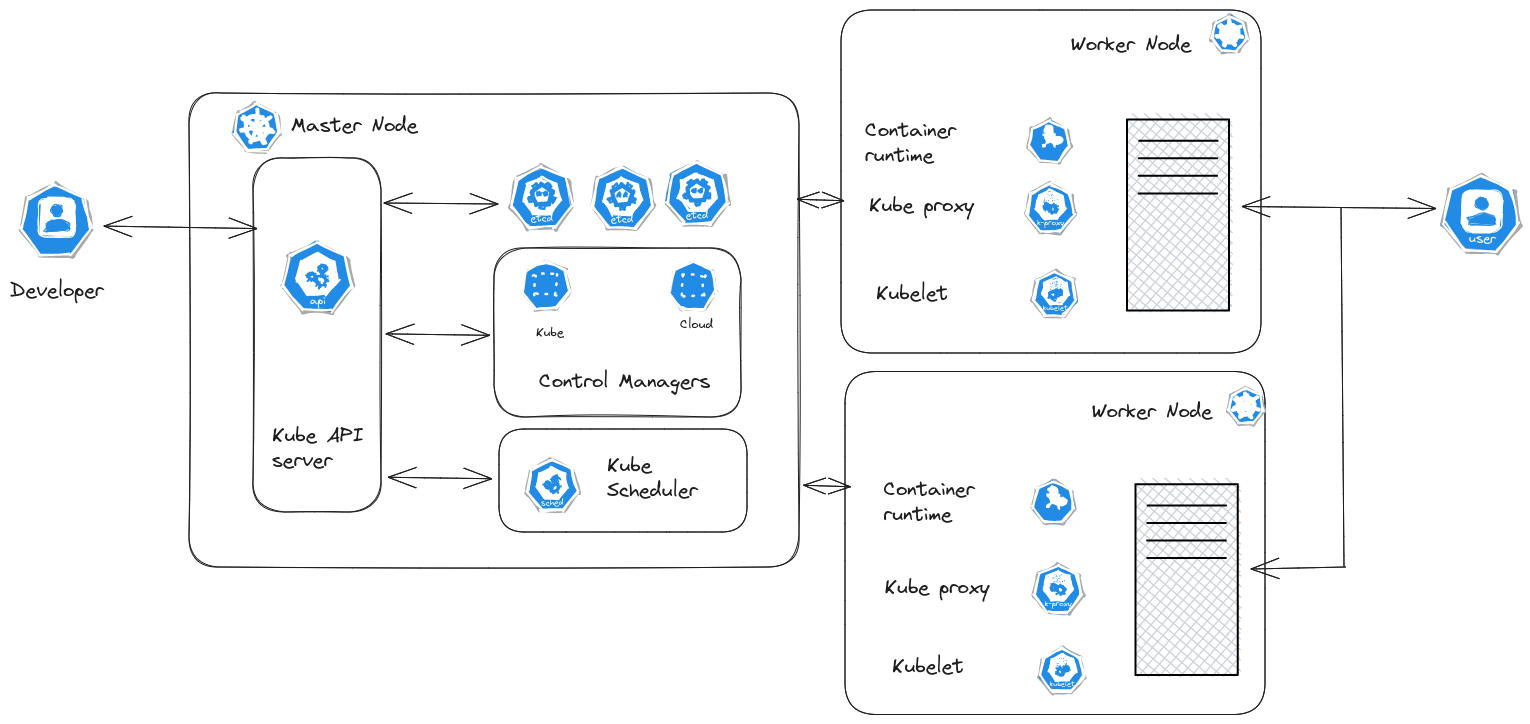 The control plane on top, worker nodes below. Every arrow into the control plane passes through the API server.
The control plane
kubeapi serverkubeapi server
Kubeapi is the primary management componenet in Kubernetes
When a kubectl comman dis invoked it is first authenticated and then validated by kubeapi server. It then reaches to etcd cluster and sen... is the front door. Every operation — a kubectl command, a dashboard click, a controller's watch — is authenticated, validated, and served here. It is also the only component allowed to write to the cluster's datastore, which makes it the choke point you scale first when the API feels slow.
etcdetcd
What is ETCD?
The full form of "etcd" is derived from the Linux directory structure. In UNIX, system configuration files for a single system are stored in a folder called "/etc." The "d" in "etcd"... is the cluster's memory: a distributed key-value store holding the desired state of everything — nodes, pods, configs, secrets, roles. If etcd is lost, the cluster forgets what it was supposed to be doing, which is why it gets the strongest backup discipline of any component.
kube schedulerkube scheduler
Scheduler decides which pods goes oon to which node. Kubelet places the pod onto the node. The scheduler looks onto each node and decides the best node for the pod.
First it filters the node based... decides where new pods go. It filters out nodes that don't meet a pod's CPU and memory requests, then ranks whatever is left — the node with the most free resources wins. Notably, it only makes the decision; it never touches a node itself.
kube-controller-managerkube-controller-manager
Kubecontroller manager is a process that monitors satate of the various components and works to bring the system to work in the desired state
The node-controller monitors the status of the nodes a... is the reconciliation loop of the cluster. It watches actual state through the API server and nudges the cluster toward desired state — the node controller, for instance, marks a node unreachable after 40 seconds of missed heartbeats and evicts its pods to healthy nodes after a grace period.
The worker nodes
kubeletkubelet
Kubelet on the worker node register the node on kubernetes cluster. When it recieves the request to load container/pod on a node, it requests the runtime engine to pull the required image and run t... is the agent on every node. It registers the node with the cluster, waits for pods the scheduler has bound to it, asks the container runtime to pull images and start containers, and reports status back to the API server.
The runtime itself is pluggable: Kubernetes standardised the interface years ago so any engine that speaks CRICRI
Initially, Kubernetes supported only Docker. Gradually, tools like Rocket came into the picture. In order to support many such tools in the Kubernetes ecosystem, Kubernetes introduced the CRI (Cont... works — containerd, CRI-O — and Docker, once the default, was retired behind a shim.
kube-proxykube-proxy
Kube-proxy is process running on each node in cluster. It looks for new services and everytime a new service is creacted it cretaes new rules on each node to forward traffic to those services to ba... keeps networking honest on each node, wiring the iptables/IPVS rules so that a Service's virtual IP actually lands on a backing pod, on this node or any other.
The unit that runs it all: podspods
The Pod is a single instance of an application. A pod is the smallest object that one can create in Kubernetes.
To scale the application, new pods can be added to the node or new pods can be added ...
The smallest deployable object is not a container but a podpods
The Pod is a single instance of an application. A pod is the smallest object that one can create in Kubernetes.
To scale the application, new pods can be added to the node or new pods can be added ... — one or more containers that share a network namespace and storage, scheduled together. Sidecar helpers ride along in the same pod.
Life of a kubectl apply
flowchart LR
    K[kubectl apply -f pod.yaml] --> A[kube-apiserver]
    A --> E[(etcd)]
    A --> S[kube-scheduler]
    S -- binds pod to a node --> A
    A --> L[kubelet on the chosen node]
    L --> R[container runtime]
    R --> P((pod running))
    L -- status updates --> A
The pod definition lands in etcd as desired state before anything runs. The scheduler notices the unbound pod and records its node choice; the kubelet on that node notices the pod assigned to it and drives the runtime until reality matches the record. Nobody ever talks to anyone else directly except through the API server — that indirection is what makes every component replaceable.
Where next
Networking is the part that took me longest to internalise — networkingnetworking
Network Namespace
//ip netns add red
//ip netns add blue
// list network namespace
//ip netns
//Execute a network command
//ip netns exec red ip link
//ip -n red link
//arp
//ip netns exec red ... collects the namespace, veth, and bridge experiments that explain what kube-proxy automates. The full seed list lives in the garden directory.